

By Yufei (Grace) Gao, J.D. candidate, Harvard Law School
STUDENT VOICES: The views expressed below are those of the student author and do not necessarily reflect the position of the Access to Justice Lab.
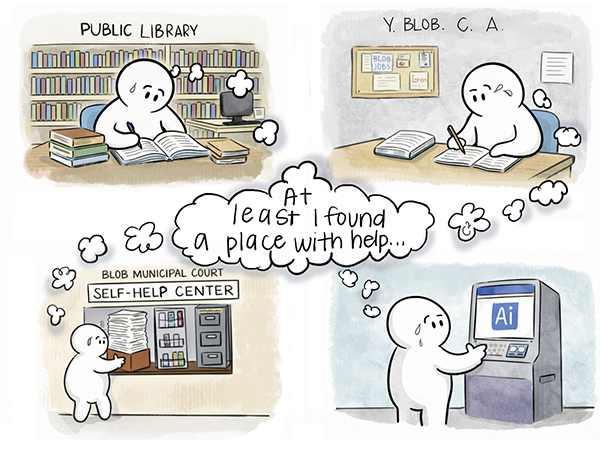
Multiple “AI legal help” tools assume conditions that often do not exist—for example, that a user has stable internet in a private working environment; that the access device is a desktop or laptop; or that the only task the user needs is obtaining or inputting information. In reality, many users rely exclusively on smartphones and still need to upload documents, fill out long forms, print, scan, or join meetings or hearings. Some of these tasks resemble paperwork completion more than browsing the internet. When developers design AI legal help for reliable broadband and a laptop, the design provides minimal benefit for those facing the steepest barriers.
The Significance of Distribution Channels
The Legal Services Corporation’s Justice Gap report finds that low-income Americans frequently experience civil legal problems and that the majority receive inadequate or no legal help. The hopes of many that AI can help address the justice gap depend in part on the digital divide. But the “digital divide” relates to more than whether broadband exists in a region. The divide also concerns adoption, affordability, device constraints, and reliability. Pew’s recent work summarizes internet and device concerns and documents that “smartphone dependence” is more common among lower-income adults. Put differently, website-exclusive AI tools might create an inequitable “two-tier” system in which better-resourced users get more reliable, higher-quality legal support.
One takeaway from all of this is that we need to be more intentional about the distribution channels. These channels determine where AI-enabled legal help should live to ensure it remains usable in practice by the most vulnerable populations.
Challenges Common to Every Channel
Before comparing different channels, it helps to name the common challenges that shape usability. Even with strong AI tools, these constraints determine whether users can safely access them, complete legal tasks, and know what to do next.
- Protect privacy in shared spaces: Users may enter sensitive facts (e.g., housing status, immigration history, debt, family issues). Shared devices and public settings create risk unless programs build in privacy defaults.
- Support real device and workflow needs: Legal tasks often require printing, scanning, uploading, saving, and returning over multiple sessions. Many chat-style tools do not support this end-to-end workflow.
- Prevent overreliance on uncertain outputs: If an AI tool sounds confident, users may treat it as authoritative, especially when they feel they have no alternatives. Errors can trigger missed deadlines or procedural missteps.
- Keep users anchored to authoritative sources: Users need direct links back to official forms, local rules, and court-specific procedures so they can verify requirements and avoid dead ends.
- Provide clear escalation and referral paths: Users need a clear “what next” option when the tool reaches its limit, including a self-help desk, hotline, legal aid, or limited-scope assistance.
- Maintain governance and updates: Legal information changes. Programs need ongoing updates, monitoring, and clear responsibility for what the tool does and does not do.
These challenges are common to all user-AI channels. But some challenges correspond to only some vectors.
Four Distribution Channels
Channel 1: Public Libraries
Libraries currently provide various forms of public technology access, including computers, reliable Wi-Fi, printers, scanners, and staff who help patrons navigate online services. This channel is therefore strongest when the main barrier is task completion. Libraries’ broader role in digital equity and digital inclusion also reinforces this function, pushing libraries to continue expanding public access and digital support.
The tradeoff is that libraries generally cannot provide legal advice, and privacy can be difficult in open spaces. Therefore, libraries constitute a strong channel for AI-enabled legal help if developers design the tool for shared-device realities and libraries implement clear privacy boundaries, including privacy screens, headphones, visible “what not to share” guidance, and automatic session timeouts.
Channel 2: Court Self-Help Centers
Judicial self-help centers exist because many litigants appear in court without counsel needing to navigate filing, forms, and procedure. A court-based AI tool can help users identify the correct forms, explain court-specific filing procedures, and clarify subsequent steps in that court. Court self-help centers offer the best channel for procedural guidance. Courts can tie AI outputs directly to jurisdiction-specific requirements and update the guidance when requirements change. This procedural integration makes court self-help centers distinct.
The main tradeoff is higher stakes. If a tool appears “official,” users may rely on it excessively. Court AI systems need clear disclaimers, consistent updates and maintenance, and an escalation path to staff support or referrals. The National Center for State Courts’ chatbot guidance emphasizes narrow scope, plain language, realistic user expectations, and ongoing updates, which apply directly to court-hosted tools.
Channel 3: Community Centers and Trusted Institutions
Community institutions including community centers, workforce hubs, nonprofits, clinics, and YMCA-style spaces can reach individuals who do not use a library regularly and find courthouses intimidating. These hubs have the advantage of being closer, in the geographical and social sense, to the communities where users encounter legal problems, including problems that surface alongside other needs (e.g., housing instability, job loss, or benefits issues).
Staff and volunteers in these spaces often serve as “trusted messengers,” meaning community members already know them and rely on them as credible guides. Digital equity planning materials repeatedly emphasize community-based organizations as trusted intermediaries for adoption and support. That relationship can reduce institutional mistrust and lower barriers to engaging with legal processes, making community members more likely to try AI-enabled legal help. Trusted messengers can also frame AI tools as informational support, set expectations about limits, and direct users to human assistance when the situation requires legal judgment.
A disadvantage concerns consistency and oversight. Sites vary in staffing, technology capacity, privacy, and referral relationships with legal aid.
Channel 4: Kiosks and “AI Terminals” as Last-Mile Access Points
Kiosks and shared “AI terminals” offer a distinct last-mile strategy because authorities can place them in many high-traffic sites, including courts, housing authorities, community hubs, and libraries. The Legal Services Corporation identifies self-help legal kiosks as an adaptable access approach, expanding access without requiring users to have reliable home internet or equipment.
Kiosks let administrators create a stable access point with strong privacy defaults. They can give users a reliable place to attend remote court hearings or meetings when they lack a private device or stable connection at home. Finally, kiosks can connect users to human help through clear prompts and one-click options, including a self-help desk, hotline, or legal aid intake.
AI Literacy at the Point of Service: Low-Cost Interventions
After sorting out the distribution channels, many users encounter a second barrier, namely, unfamiliarity with safe AI use. Institutions may address this gap with the following low-cost, scalable interventions:
- AI Safety Labels: Post a one-page disclosure shown at startup and displayed near terminals stating tool capabilities and limitations (e.g., no representation), data retention policies, and contact information for human help.
- Multilingual Brochures and Prompt Templates: Provide short checklists and sample prompts that help users ask more effective questions, complete common workflows, and improve the quality of AI outputs.
- Brief Workshops: Produce 20- or 30-minute modules led by librarians or digital navigators on privacy, verification, and escalation procedures to reach human support.
- Digital navigators: Train and employ more digital navigators. The National Digital Inclusion Alliance defines the digital navigator model as trusted, ongoing support that helps individuals obtain connectivity, access devices, and build digital skills to use AI legal tools effectively.
Conclusion
Focusing on distribution channels addresses one layer of the problem: whether people can access and use AI-enabled legal help in the first place. The next set of questions is policy-facing. Who should set the standards for legal AI tools, including privacy defaults and plain-language design? How should courts, libraries, and community organizations fund the infrastructure, including kiosks and digital navigators? Access is necessary, but safe, usable legal AI will require standards and sustained funding, not tools alone.
If you’re interested in more on this topic, listen to our podcast episode.